Sunday, June 14, 2020

Datalogic Gryphon GM4100 Reference Guide

About the Datalogic Gryphon GM4100

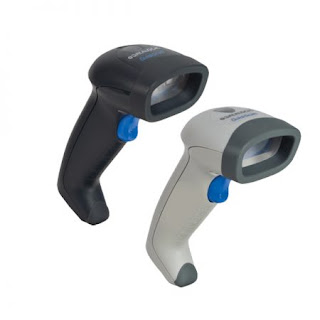
Datalogic Gryphon GM4100

Advancements in the LED technology used in this reader significantly improve the illumination of the target field of view, resulting in higher scan efficiency. Whether used in Single Trigger or Continuous Mode, the ergonomic design of the reader will help to promote comfortable handling during extended periods of use.

See "Interface Selection"on page 67 for a listing and descriptions of available interface sets by model type.

Unpacking

Check carefully to ensure the reader and any accessories ordered are present and undamaged. If any damage occurred during shipment, contact Datalogic Technical Support. Information is shown on page 9.

KEEP THE PACKAGING. Should the unit ever require service, it should be returned in its original shipping container.

Setting Up the Reader

Depending on whether you are using a Corded or Mobile version of the Gryphon, follow the steps provided in this section to connect and get your reader up and communicating with its host.

1. Install the Batteries

2. Install the Interface Cable (Corded) or Connect the Base Station (Mobile)

3. Select the Interface Type

4. Configure Interface Settings (only if not using factory settings for that interface)

5. Configure Other Features (if modifications are needed from factory settings)

Check out our full range of Barcode Scanners.

Download the reference guide.

Zebra LS3408 Product Reference Guide

Zebra LS3408 Handheld Scanner

Zebra LS3408

Introduction

The scanner combines excellent scanning performance and advanced ergonomics to provide the best value in a lightweight laser scanner. Whether using it as a hand-held scanner or in presentation (hands-free) mode in a stand, the scanner ensures comfort and ease of use for extended periods of time.

This scanner supports:

• Standard RS-232 connection to a host.

• Keyboard Wedge connection to a host, which interprets scanned data as keystrokes. This interface supports the following international keyboards (for the WindowsTM environment): North America, German, French, French Canadian, Spanish, Italian, Swedish, UK English, Japanese, and Brazilian-Portuguese.

• Wand Emulation connection to a mobile computer, a controller, or host which collects the data as wand data and decodes it.

• Scanner Emulation connection to a mobile computer or a controller which collects the data and interprets it for the host.

• Connection to IBM® 468X/469X hosts.

• USB connection to a host. The scanner autodetects a USB host and defaults to the HID keyboard interface type. Scan programming bar codes to select other USB interface types. This interface supports the following international keyboards (for the Windows environment): North America, German, French, French Canadian, Spanish, Italian, Swedish, UK English, Japanese, and Brazilian-Portuguese.

• Synapse capability which enables connection to a wide variety of host systems using a Synapse and Synapse adapter cable. The scanner autodetects Synapse.

• Configuration via 123Scan.

View our full range of barcode scanners.

Download the product reference guide.

Honeywell Xenon XP 1950g Quick Start Guide

Honeywell Xenon XP 1950g

Honeywell Xenon™ XP 1950g

The Xenon™ XP 1950 series scanners deliver premium performance and class-leading durability for improved employee productivity and maximum uptime – leading to a lower TCO.

Fast, Accurate Scanning

Superior scanning performance, even on damaged and poor-quality barcodes, eliminates wasted seconds from every transaction.

Note: Refer to your User Guide for information about cleaning your device.

Get Started

Turn off the computer's power before connecting the scanner, then power up the computer once the scanner is fully connected.

View our range of Barcode Scanners.

Download the quick start guide here.

Saturday, August 19, 2017

The Pros and Cons of Barcode Handheld Scanners

Barcode handheld scanner commonly seen in the establishment that sells basic commodity products. A device scans the bar codes and has to hold by the person assigned in the cashier. Most of the Barcode handheld scanner is design like a gun that all you need is to point it the scanner to the barcode of the product. Barcode handheld scanner can be cordless or not based on the need of the business; however, if you can observe most of the establishment uses the wireless Barcode handheld scanner in the operation.

barcode scanners


Here are the pros for your business and cons to inform you of the thing that you need to take note so it will not affect the future of the business.

PROS

The advantage that Barcode handheld scanner can give to your business stated below:
  • Effective and fast scanning of the products
    Many or not products to be scan by in the cashier is not a problem when you have Barcode handheld scanner at hand. It is effective in bulk scanning; all you need to do is scan the product and place in the computer the quantity of the same product. The computer will compute it for you.
  • Ideally for inventories
    Barcode handheld scanner is very useful in inventory in the warehouse. It is light to carry and some of the Barcode handheld scanner product has the capacity to store data in the scanner.
  • Cheap and flexible
    Barcode handheld scanner is cost effective and you can bring it anywhere the businesses premises. The wireless is ideal than the chord scanner and allows you to carry it in the warehouse.
CONS

Barcode handheld scanner is not applicable to use in some times. Here are some of the disadvantages of the scanner to your business:
  • Reading zone
    Not all the times you can scan far away from bar codes of the product. When you go to a warehouse, you know that there are products that it place above the shelf. Some of Barcode handheld scanner only allows having a less than 20 feet away from the device to scan the product. In these instances, you had better use barcode scanner that can do the job and equip with the features that can scan in long distances.
  • Must be held by the user
    As indicated with the name of the scanner, it has to be hold to do the scanning. With this limitation, it will affect the effectivity and productivity of the user that is a big loss in business. You know that in business, time is money so if there is a delay, money in that period is gone forever. It is best to work with both hands if you are using one hand to hold the scanner, only one hand can fully make the work fast.
Using Barcode handheld scanner is very effective in the productivity of the staff and the business. It saves a lot of time and it gives you the chance to spend less amount because it is effective and cheap I the market. With the pros that it has, overall, it adds a lot to the welfare of the business. For more information, please visit https://www.gammasolutions.com/